
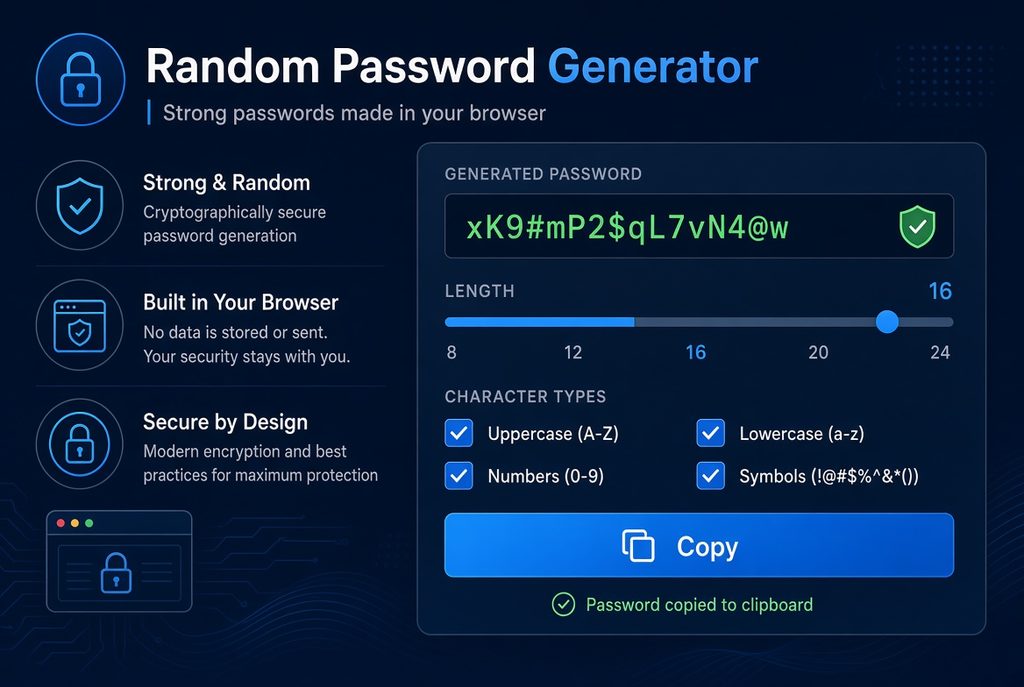
This random password generator runs entirely inside your browser. Set the length, pick the character types, and press the button — the password is created on your own device using the browser’s cryptographic random source, and it never touches a server.
How to use this random password generator
Drag the slider for length, tick the character types you need, press Generate again, then press Copy. That is the whole thing.
If a site rejects special characters, untick Symbols. If you have to write the password down or read it out to someone, tick Exclude look-alikes and the result will not contain 0 and O, or 1 and l and I.
Strong password generator: how long should a password be
There is only one reliable measure: entropy, in bits. It describes how many attempts are needed to try every possibility. Each extra bit doubles the difficulty.
The table below assumes 1012 guesses per second, which is the scale of a modern GPU cluster attacking a fast hash:
| Password | Pool | Entropy | Time to brute-force |
|---|---|---|---|
| 6 digits | 10 | 19.9 bits | under a second |
| 8 digits | 10 | 26.6 bits | under a second |
| 8 lowercase letters | 26 | 37.6 bits | under a second |
| 8 mixed characters | 85 | 51.3 bits | about 45 minutes |
| 12 mixed characters | 85 | 76.9 bits | about 4,500 years |
| 16 mixed characters | 85 | 102.6 bits | about 240 billion years |
| 20 mixed characters | 85 | 128.2 bits | far beyond the age of the universe |
The line worth remembering is the gap between rows four and five: eight characters lasts 45 minutes, twelve characters takes 4,500 years. Four more characters, roughly fifty million times harder.
- Ordinary sites: 12 characters
- Email, banking, main accounts: 16 characters — email matters most, because every other account is recovered through it
- Crypto wallets, servers: 20 or more
Note that the table assumes the worst case, where a site stores passwords as a fast hash. If they use a salted slow hash such as bcrypt or Argon2, the real figures are orders of magnitude longer. You have no way of knowing which a given site uses, so planning for the worst case is the right call.
Length beats complexity
The rule that a password "must contain uppercase, numbers and symbols" has been around for twenty years, but it solves a different problem from the one most people assume.
| Approach | Entropy |
|---|---|
| 8 characters, upper + lower + digits + symbols | 51.3 bits |
| 12 characters, lowercase only | 56.4 bits |
The second one is simpler, easier to remember, easier to type — and stronger.
Complexity rules exist to stop people choosing password123. Once a password is randomly generated, length is the only variable still doing any work. That is why this tool defaults to 16 characters rather than piling on symbols.
This is not just an opinion. The US National Institute of Standards and Technology says the same thing in Special Publication 800-63B, its official digital identity guidance: systems should not impose composition rules requiring uppercase, numbers or symbols, because they produce predictable substitutions without meaningfully improving entropy. NIST instead asks systems to support passwords of at least 64 characters, and recommends a minimum of 15 where a password is the only factor. It also says organisations should not force periodic password changes — only change a password when there is a reason to think it has been exposed.
Generate password offline: why this runs in your browser
Search for a password generator and you will find plenty of sites. Some of them send your settings to a server, generate the password there, and send it back.
That means your new password left your computer at the moment it was created and passed through someone else's server. Whether they logged it is something you cannot verify.
This page works differently:
- Passwords come from
crypto.getRandomValues(), the browser's cryptographic random source, not ordinaryMath.random() - Everything happens on your device. There is no network request at all
- Nothing is stored, logged or counted
- Close the tab and it is gone
You can verify this yourself in ten seconds: disconnect from the internet and the page still generates passwords. A tool that works offline cannot be sending your data anywhere.
Math.random versus crypto.getRandomValues
Many simple generators use Math.random(). It is designed to look random, which is fine for animations and games — but its output sequence is predictable: observe enough values and you can work out what comes next. crypto.getRandomValues() draws from the operating system's cryptographic random source, built for security use.
This tool also handles one more detail: it uses rejection sampling when drawing random numbers, to avoid the bias introduced by a plain modulo. Without it, characters near the start of the pool get picked slightly more often and the real entropy falls below the theoretical figure.
Mozilla's reference for Crypto.getRandomValues() describes it as giving "cryptographically strong random values", seeded with enough entropy to be suitable for cryptographic purposes — and lists Math.random() separately as "a non-cryptographic source of random numbers". That one line is the whole difference.
Where to keep it afterwards
Nobody remembers a random 16-character password. That is the point, and it creates a new problem.
- Use a password manager. The one built into your browser is good enough. The principle is that you remember one master password and hand over the rest
- One password per site. The value of random passwords is isolation: one site gets breached and the others are untouched. Reusing one throws that away entirely
- Turn on two-factor authentication for your email and your password manager. Those two are the master keys
- Do not keep them in Notepad or a spreadsheet. A plain text file is the easiest thing to forget about and the easiest thing to copy wholesale
- Do not send passwords by email or chat. Both leave a searchable copy behind for years
Password generator words: why this tool uses characters instead
Some generators build passwords out of real words — four or five random words strung together, the approach popularised by the XKCD comic. They are far easier to remember than a string of symbols, and the good ones are genuinely strong.
The catch is that strength depends entirely on how many words the generator draws from. Four words picked from a 2,000-word list gives about 44 bits of entropy — weaker than 8 random mixed characters. Four words from a 7,776-word list gives about 51 bits. Six words from that same list gives 77 bits, which is genuinely strong.
So a word-based password has to be long in words to match a short random one in characters. If you are going to store it in a password manager anyway, the memorability stops mattering and random characters do the same job in less space.
Word-based generation is worth having for the few passwords you must actually memorise: your device login and your password manager's master password. For everything else, the generator above is the better fit.
Frequently asked questions
Is this random password generator safe?
Passwords are generated locally in your browser, never sent to a server and never logged. You can disconnect from the internet and use it to confirm this for yourself.
Can the generated passwords repeat?
In theory yes, in practice no. A 16-character mixed password has around 2102 combinations, a number vastly larger than the count of grains of sand on Earth.
How long should my password be?
Twelve characters for ordinary sites, sixteen for email and banking, twenty or more for crypto wallets and other high-value accounts.
Why won't a site accept my generated password?
Some sites cap the length or ban certain symbols. Untick Symbols and shorten the password. That is a limitation of the site, not a problem with the password.
Why exclude look-alike characters?
Zero and capital O, and the digit 1 against lowercase l and capital I, are nearly identical in many fonts. If the password has to be written down, read aloud or retyped on another device, excluding them saves trouble. The pool gets smaller and entropy drops slightly, which a few extra characters makes up for.
Can I generate several at once?
Each press of Generate again produces a completely new password. Copy the current one, then press again.
Is this password generator free?
Yes, free with no account, no sign-up and no limit on how many passwords you generate. There is nothing to pay for because there is no server doing the work — everything runs on your own device.
Related guides: